
My Earthquake Alerts Pro
JRustonApps B.V.Weather
4.8403.00 Reviews
- Version
- 26.3.0
- Installs
- 50.00K
- Age Rating
- Everyone
Screenshots
Our Review of My Earthquake Alerts Pro
 Analysis by Appyee
When the ground shakes, an alert is useful only if it helps you make sense of what is happening without adding confusion. I look at My Earthquake Alerts Pro as a focused earthquake-monitoring tool: it brings nearby and worldwide activity into one place, with maps and alerts at the centre of the experience. That makes it more relevant to people who want to follow seismic events deliberately than to someone looking for an all-purpose weather app.
A sensible routine for checking seismic activity
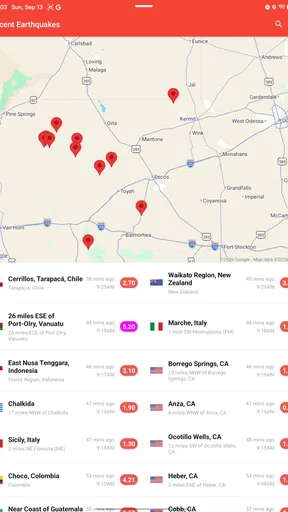
My most useful approach is to treat the app as a check-in tool, not as something to watch constantly. I would start by choosing the places I genuinely care about, then use the feed and map to understand the events that appear there. That might mean my home area, a city where family lives, or a destination I am planning to visit. A focused set of locations makes an earthquake feed easier to interpret than trying to follow every event worldwide.
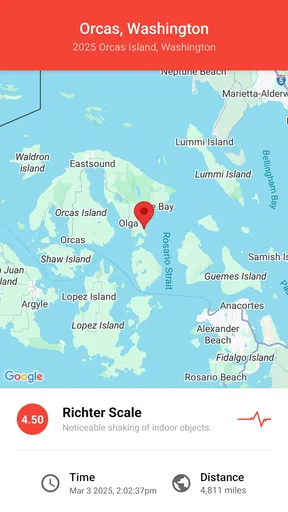
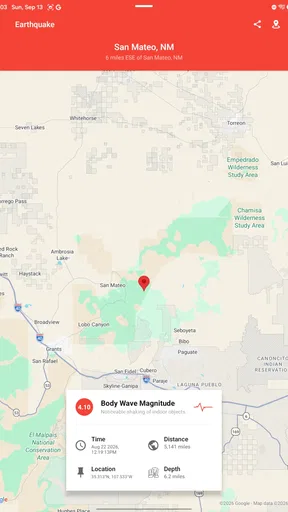
In an everyday situation, imagine getting an alert while you are commuting or preparing to leave home. Rather than reacting to the notification alone, I would open the event, check where it occurred on the map, and look at its reported magnitude and depth. Those details help put the alert into context: a quake somewhere in the wider region is not automatically a reason to change plans, while an event close to a place I care about deserves a closer look. The app can inform that judgment, but it cannot tell me what is safe in my particular building or replace local emergency guidance.
This is where a repeatable habit matters more than a crowded notification setup. I would decide in advance which areas deserve alerts and which ones I only want to check occasionally. That keeps the feed useful and reduces the chance that frequent reports turn into background noise. For people who follow earthquakes for study or personal interest, the worldwide view is valuable; for someone who only wants reassurance about one neighbourhood, a narrower routine is likely easier to live with.
Settings and choices that affect usefulness
Custom notifications are one of the app’s practical strengths, but I would set them with care. Before enabling alerts broadly, I would think about what I need to know and how often I am willing to be interrupted. A person with relatives in several seismic regions may want a wider watch list; someone who mainly wants local awareness may prefer to keep the scope close to home. The best setup is not necessarily the one that produces the most notifications, but the one that makes each notification worth checking.
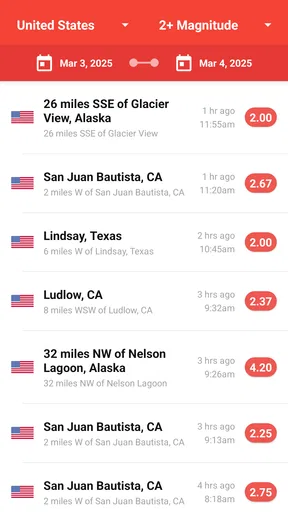
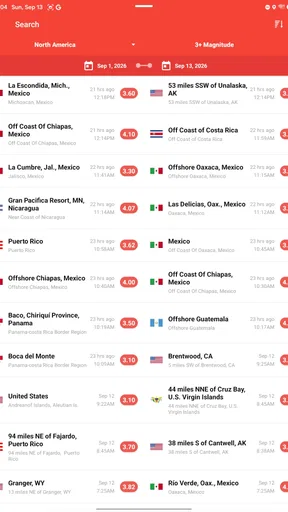
Filters by magnitude and date can also make a difference when browsing. They are useful for narrowing a busy list to a particular kind of event or reviewing activity over a chosen period. I would use them as reading tools rather than treating a filter as a prediction or safety threshold. Magnitude is only one part of understanding an earthquake, and the location and depth shown alongside it matter when deciding whether an event is relevant to a particular place.
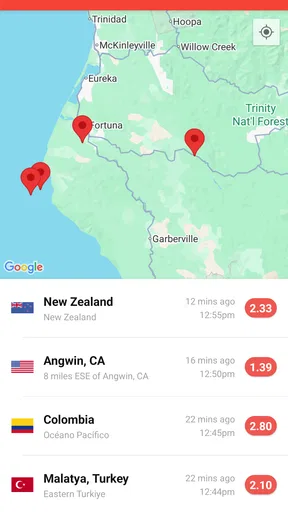
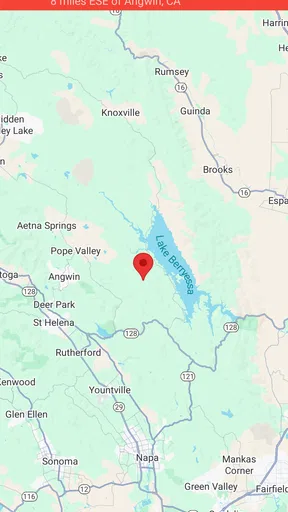
Maps and historical information serve different purposes, so I would not use them interchangeably. The map helps answer where an event happened; looking back through earlier activity can help me explore how a region’s recorded events have varied over time. That can be interesting for learning, but patterns in a historical view should not be read as a timetable for future earthquakes. Keeping that distinction clear is a useful habit for anyone who likes exploring the data in detail.
Faster ways to make the feed work for you
For a quick check, I would make the alert itself the start of a short workflow: identify the place, inspect the event details, then decide whether I need more information from an official local source. That is more useful than repeatedly reopening the feed without a question in mind. If the event is far from the places I follow, I can move on; if it is close to an area I care about, I can take the time to check the map and relevant local updates.
There is also a good case for separating casual browsing from purposeful review. On an ordinary day, I might check only the current feed and leave historical exploration for a quieter moment. If I am comparing activity in different places, I can use the date and magnitude filters to keep the comparison manageable instead of scrolling through everything. These small choices turn a broad global feed into a more personal reference without assuming that the app has shortcuts or automation it does not advertise.
The interface’s dark theme is a welcome fit for checking an alert at night, when a bright screen can feel intrusive. Still, I would avoid letting an easy-to-read map become a reason to keep monitoring every update. Earthquake reporting can prompt understandable concern, and a calmer routine—check the relevant details, confirm important information through local authorities, then put the phone down—makes the app more helpful rather than more stressful.
Where it fits among weather and alert apps
Compared with a general weather app, this is a narrower tool. A typical weather app is the more convenient choice when the question is whether to bring a coat or expect rain; this app is the more relevant choice when the question is where earthquake activity has been reported and how it relates to places I follow. It is not a replacement for broad forecasts, and its value depends on whether earthquake information is something I actually want to check.
It also differs from simply relying on occasional news reports. News can explain the wider human impact of a significant event, while a dedicated feed is better suited to browsing reported activity and seeing locations on a map. I would use the two for different purposes rather than expecting a monitoring app to provide the full context that a local report or emergency service can offer. Anyone who needs instructions during a crisis should prioritize official guidance over an app feed.
That focus makes the app a good match for people in earthquake-prone areas, those with family or work ties across regions, and readers who enjoy following geology. It is less compelling for someone who never checks seismic activity, or for a person who wants a single app to cover every kind of weather and hazard. It is also not the right tool for someone who expects an alert to predict an earthquake or guarantee advance warning; monitoring reported events is not the same as forecasting them.
What to expect from the paid edition
Developed by JRustonApps B.V., this is a paid weather app priced at $2.99, with in-app purchases listed at $0.99 per item. I would check the purchase screen carefully before buying so I understand which option I am choosing and whether any additional purchase is relevant to how I plan to use it. Its Everyone age rating makes it suitable for a broad audience, though the subject itself can naturally be unsettling for younger users.
The app has a 4.8 average from around 5,800 ratings, with about 400 written reviews, and more than 50,000 installs. Those figures suggest that plenty of people have chosen it, but they do not tell me whether its alert style or level of detail will suit my own routine. It was released on May 3, 2015, and its current version is 26.3.0; the stated minimum operating-system requirement is 7.0. I would still check compatibility on my device before purchasing, especially if it is an older phone.
Because the app is paid, its strongest case is for someone who expects to return to earthquake monitoring rather than install it for a passing curiosity. If I only want occasional context about a major event, a free general news source may be enough. If I want a focused feed, custom alerts, map-based browsing, and historical exploration in one dedicated place, paying for this app is easier to justify.
Using the app with good judgment
The important limit is that an earthquake feed is an information tool, not an emergency plan. I would not assume that every report arrives instantly, that every alert means danger where I am, or that an app can assess the safety of a particular building. When an event could affect me, I would check local authorities and follow their instructions. Keeping that boundary in mind lets the app be useful without asking it to do a job it cannot do.
I also would not leave every possible alert enabled just because the app makes a broad view available. Too many notifications can make it harder to notice the one that matters to me. A short list of meaningful locations, paired with occasional browsing of the wider map, is a better trade-off for most people. If I am following a region for research or personal interest, broader monitoring may be worthwhile; if I am trying to reduce worry, a limited setup is kinder and more practical.
Getting Started
So, first things first, downloading My Earthquake Alerts Pro is a breeze. Available on both Android and iOS, it’s a quick install and soon enough, you’re greeted with a clean and intuitive interface. No need to fumble around - the design is straightforward, with a dark theme that’s easy on the eyes (especially at night).
Features That Stand Out
The app’s got some pretty cool features worth mentioning. You can set up custom notifications for earthquakes near your area, or anywhere else you might be interested in. It’s like having a personal seismologist in your pocket. Now, that’s something!
What I love is the real-time data it offers. The app pulls information from various reliable sources, giving you updates on magnitude, depth, and even the location of the quake. If you’re a data nerd, you’ll appreciate the detailed charts and maps. It feels like you’re in control, with all the info you need right at your fingertips.
User Experience
Using the app feels seamless. The loading times are quick, and I’ve yet to experience any crashes or bugs. The developers clearly put a lot of thought into the user experience. You can easily filter earthquakes by magnitude or date, which is super handy when you’re trying to track specific events.
One of my favorite features is the ability to view historical data. It’s fascinating to see patterns emerge over time, and it’s a great educational tool for anyone interested in geology or natural disasters. Plus, the app doesn’t bombard you with ads, which is a massive plus in my book!
Is It Worth the Price?
Okay, so let’s talk about the price tag. My Earthquake Alerts Pro isn’t free, but considering the premium features it offers, it’s pretty reasonable. It’s a one-time purchase, which means no pesky subscriptions to worry about. If staying informed about earthquakes is important to you, then it’s a worthy investment.
Final Thoughts
All in all, My Earthquake Alerts Pro is a solid app for anyone living in quake-prone areas or those who just want to keep tabs on global seismic activity. It’s informative, user-friendly, and reliable. Whether you’re a casual user or a hardcore enthusiast, this app has something to offer.
So, if you’re looking for a way to stay ahead of the tremors, give My Earthquake Alerts Pro a go. You might just find it to be an invaluable tool in your app arsenal!
Verdict
Strengths of My Earthquake Alerts Pro
- Real-time earthquake alerts.
- Customizable notification settings.
- No ads for distraction-free use.
- Detailed seismic activity maps.
- User-friendly interface.
Limitations of My Earthquake Alerts Pro
- Limited free features available.
- May drain battery with constant alerts.
- Needs internet for real-time updates.
- Occasional false alerts reported.
- Some features require premium subscription.
Other Releases by JRustonApps B.V.
View All
My Moon Phase - Lunar Calendar
Weather4.8

My Tide Times - Tables & Chart
Weather4.8

My Hurricane Tracker & Alerts
Weather4.7

My Lightning Tracker Pro
Weather4.7
Similar Picks in This Category
View All
Weather - By Xiaomi
Xiaomi Inc.4.1

Weather & Radar Forecast
WetterOnline4.8

Weather
OneLouder Apps4.6

AccuWeather: Weather Radar
AccuWeather3.6

The Weather Channel - Radar
The Weather Channel4.6

1Weather Forecasts & Radar
OneLouder Apps4.3
Frequently Asked Questions
What features does My Earthquake Alerts Pro offer?
My Earthquake Alerts Pro provides real-time alerts for earthquakes worldwide, using data from multiple sources to ensure accuracy. It offers customizable notifications, detailed seismic activity maps, and the ability to track historical earthquake data. Users can also set alert thresholds based on magnitude and location preferences.
How does My Earthquake Alerts Pro ensure timely notifications?
The app integrates data from reputable seismic monitoring agencies, ensuring fast and accurate alerts. Users can set personalized notification preferences, including vibration and sound alerts, to stay informed immediately when an earthquake occurs. This ensures users receive information as soon as it becomes available.
Is My Earthquake Alerts Pro user-friendly for beginners?
Yes, the app is designed with a clean, intuitive interface that makes it easy for beginners to navigate. It includes helpful tutorials and FAQs to guide users through setting up their preferences and understanding the app’s features. The straightforward design ensures a smooth experience for all users.
Can I access historical earthquake data with My Earthquake Alerts Pro?
Absolutely, the app offers access to a comprehensive database of past earthquakes. Users can search and filter historical data based on location, date, and magnitude. This feature is particularly useful for researchers or those interested in understanding seismic patterns over time.
Does My Earthquake Alerts Pro require an internet connection to function?
Yes, an internet connection is necessary for My Earthquake Alerts Pro to receive real-time data and notifications. However, once data is downloaded, users can access some features offline, such as viewing past earthquake data and maps. An active connection ensures the app functions optimally.
